Give three frontier models the same prompt, and you’ll get three distinct interpretations of what “good” means. I discovered this gradually, over months of working with AI coding assistants on real projects.
Early on, I’d occasionally switch models mid-task, sometimes because I was curious and sometimes because I wanted a second opinion on a tricky problem. I’d notice changes in the outputs, but I couldn’t pin down what was driving them. Was it my prompt? The task itself? The model? Some combination of all three? The variables were tangled together, and I wasn’t being rigorous enough to isolate them.
As I started comparing models more intentionally, using the same prompt and context across different models, the patterns became harder to ignore. What surprised me wasn’t that different models gave different answers—that part was expected—but how differently they interpreted the same instructions. One model would take requirements literally and produce minimal output. Another would read between the lines and add error handling I hadn’t asked for. A third would restructure my entire approach.
None of these responses were wrong, exactly. They were just… different. And that gap fascinated me.
So I started paying closer attention. I was already aware that plenty of people were benchmarking models, testing them across tasks, and publishing leaderboards. And I think anyone who regularly uses more than one model already knows, at a practical level, that the models feel different. But I found myself wanting to understand what those differences actually were outside of a benchmark score.
When I got an output I liked from one model, I’d feed the same prompt to another just to see what changed. I’d ask models to critique each other’s work. What began as idle curiosity slowly turned into a kind of informal research project: understanding why the same words could produce such different results.
Over time, I noticed patterns. Some prompts worked reliably across models: clear, specific, well-structured. Others were coin flips. The variance wasn’t random. It was a signal. The models themselves behave differently by design, but how I communicated with them mattered just as much.
I dug deeper. I researched prompt engineering best practices from frontier model vendors. I learned that context engineering—how you structure and present information—was just as important as what you asked for. My goal shifted from “get this task done” to “write prompts that work reliably, regardless of which model executes them.”
That evolution led to my AI Code-Off experiments: intentional, structured comparisons where I pitted Claude, Gemini, and GPT-5 against each other on complex tasks like 2,000-line Python refactoring, documentation improvements, and README rewrites. Every comparison taught me something new about what makes prompts work.
Along the way, I ran into an interesting problem. When I asked models to evaluate each other’s work, they’d give scores. But their criteria were completely different. I’d add guardrails like “score this on a 100-point scale,” but a 100-point scale can be comprised of anything the LLM thinks is relevant. One model might weight “creativity” heavily. Another might focus on “safety.” A third might penalize verbosity while the first rewards it.
The numbers looked comparable. The criteria behind them were completely different.
I needed a rubric—a structured scoring system that forced all models to evaluate against the same dimensions. Not “rate this prompt,” but “rate this prompt on Actionability, Completeness, Token Efficiency, and six other specific criteria, using these definitions and these scoring thresholds.”
Trial and error shaped that rubric. I even asked the models themselves what would make a given prompt better. But running those experiments manually got tedious. Every comparison required loading the same context, swapping models, running the same prompt, collecting outputs, and repeating. For a four-stage experiment across three models, that’s twelve separate interactions at a minimum. Human error crept in: forgetting where I was, accidentally using yesterday’s prompt version, having to start over.
My goal was practical: get more consistent behavior from different models on the same tasks so I could get past blockers, ship working code, and move faster. But after doing this for the better part of a year, I also saw a chance to turn those lessons into something useful for other people.
The point was not to optimize for Claude, GPT, Gemini, or any other model specifically. It was to improve prompt hygiene across models: clearer criteria, fewer hidden assumptions, and more consistent output no matter which model runs the prompt. I wanted a way to help people improve their prompts without sending them to a vendor-specific tool or website that nudged them toward model-specific optimizations.
So I built something to fix that. That’s how Prompt Forge was born. The repo is coming soon!
What Prompt Forge does
Prompt Forge evaluates AI prompts across 9 weighted dimensions and generates optimized versions. Think of it as a code linter, but for prompts.
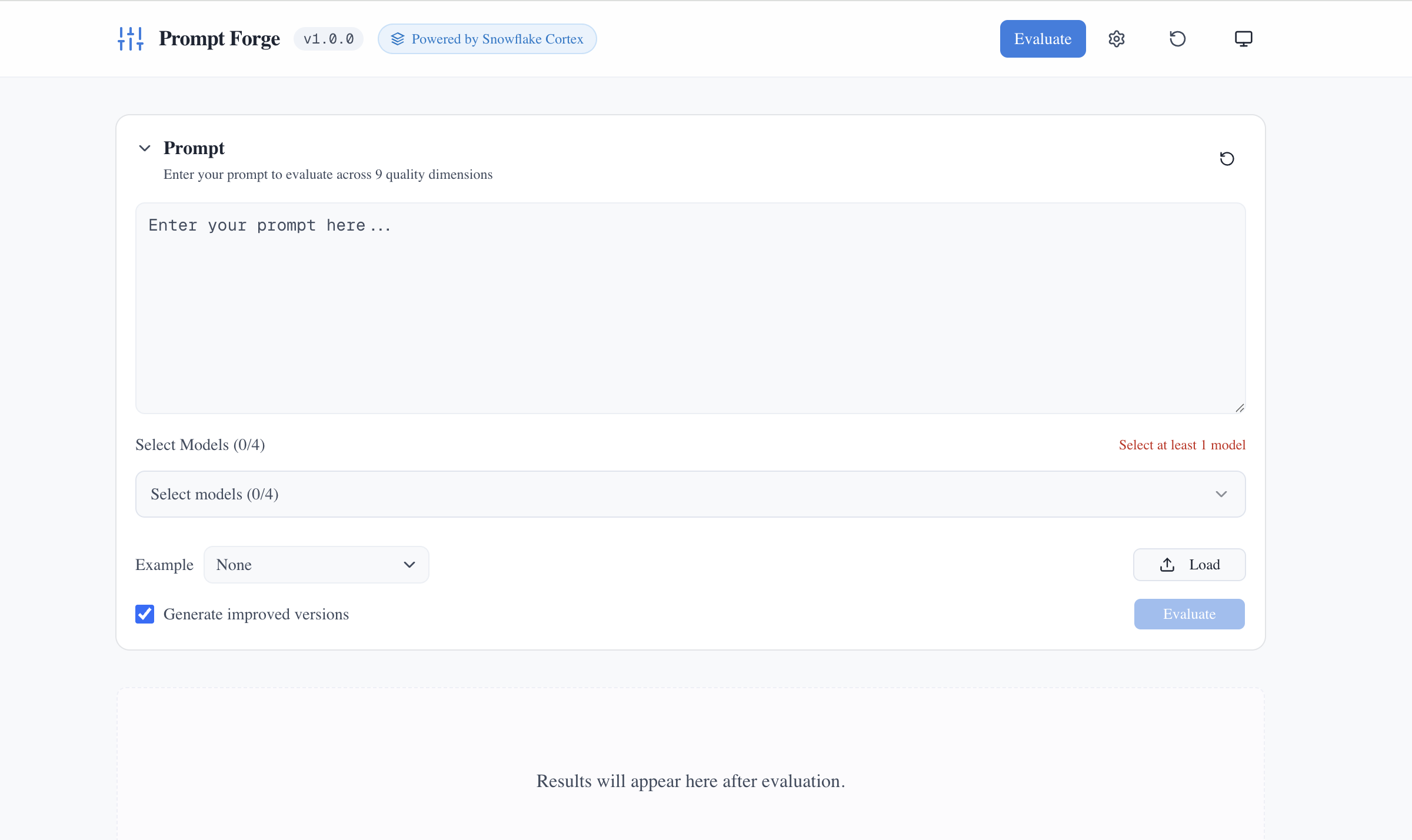 The interface is intentionally simple: enter your prompt, select a model, click Evaluate.
Here’s the workflow:
- Enter your prompt
- Select one model (or up to four for comparison)
- Click Evaluate
- Get dimension-by-dimension scores, identified issues, and recommendations
- Copy the optimized prompt
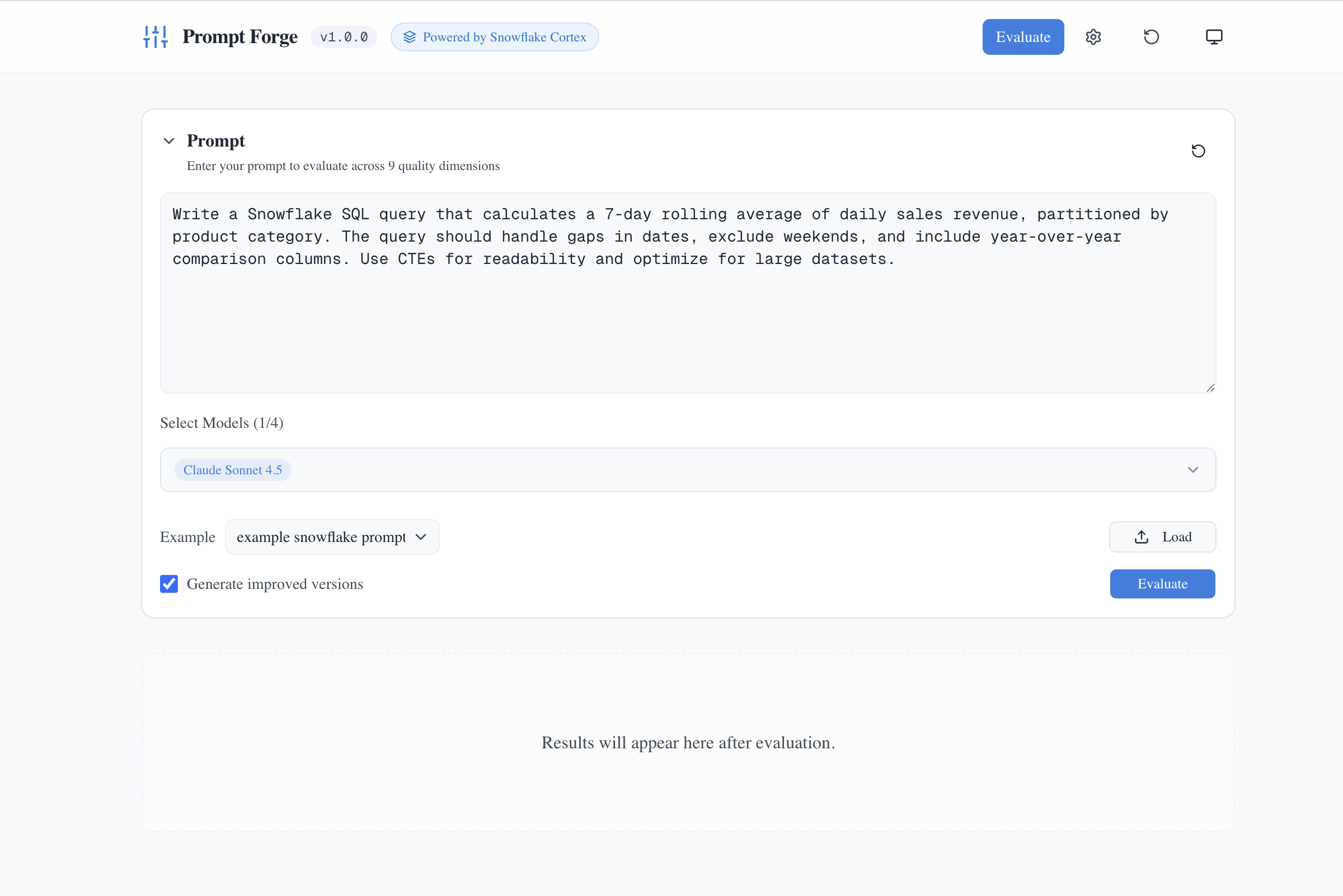 Load a built-in example or paste your own prompt. Here, a Snowflake SQL query request is ready for evaluation with Claude Sonnet 4.5 selected.
Once you click Evaluate, the tool runs all 9 dimensions in parallel:
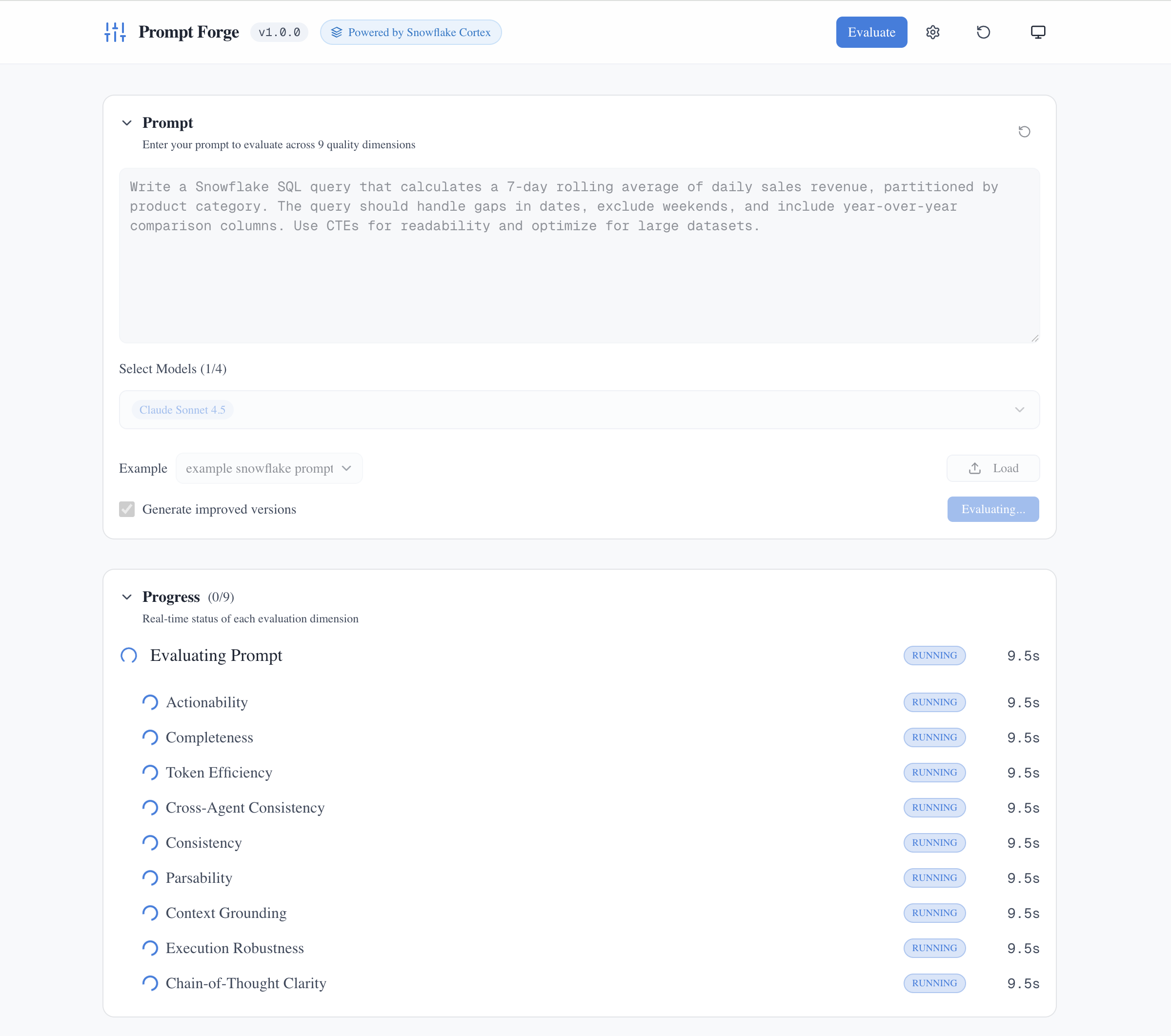 Real-time progress tracking shows each dimension being evaluated simultaneously. The entire analysis typically completes in under 90 seconds.
For multi-model comparison, the workflow is the same, but you select up to four models and get a side-by-side analysis with comparison charts. You can tune how many models run simultaneously in Settings > Evaluation, retry only the models that failed, and export the full results as a markdown report.
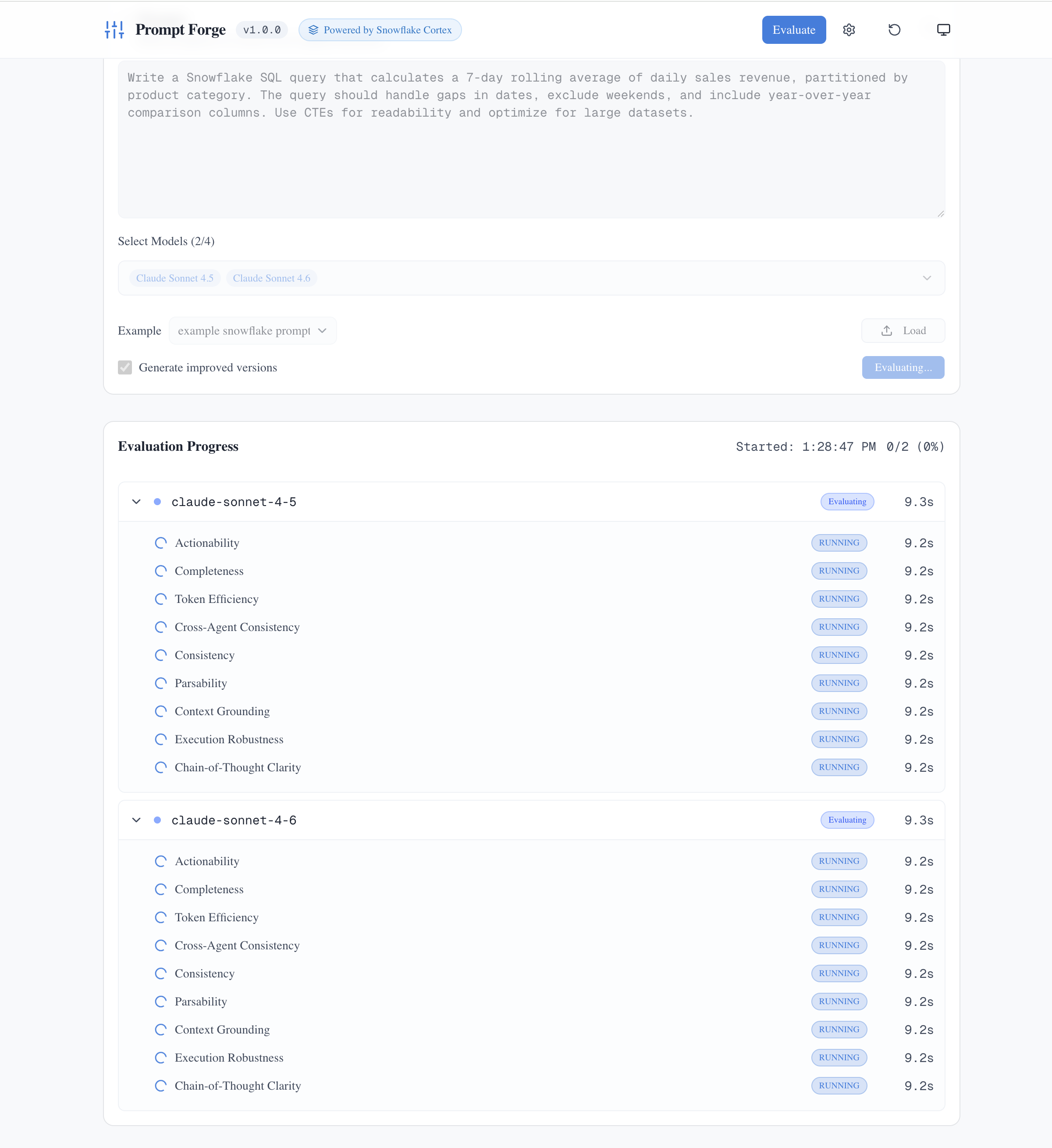 Multi-model mode evaluates the same prompt across multiple LLMs simultaneously, with real-time progress tracking for each dimension.
The demo is straightforward: mediocre prompt in → multi-model scores → optimized version out → watch how much more consistent your outputs become across different models.
The 9 dimensions
The evaluation rubric covers:
| Dimension | Weight | What it measures |
|---|---|---|
| Actionability | 2.0x | Clear, executable instructions |
| Completeness | 2.0x | All necessary information provided |
| Execution robustness | 1.5x | Completion criteria and error handling |
| Cross-agent consistency | 1.0x | Consistent behavior across different LLMs |
| Chain-of-thought clarity | 1.0x | Step-by-step reasoning scaffolding |
| Consistency | 0.75x | No internal contradictions |
| Parsability | 0.75x | Easy for LLMs to parse and follow |
| Context grounding | 0.5x | Examples and context provided |
| Token efficiency | 0.5x | Information density without bloat |
These dimensions weren’t pulled from thin air. They emerged from research into prompt engineering best practices published by frontier model vendors, trial and error from my Code-Off experiments, and, importantly, asking the models themselves what would make a given prompt better. I focused especially on prompts meant for non-human, autonomous agent executors.
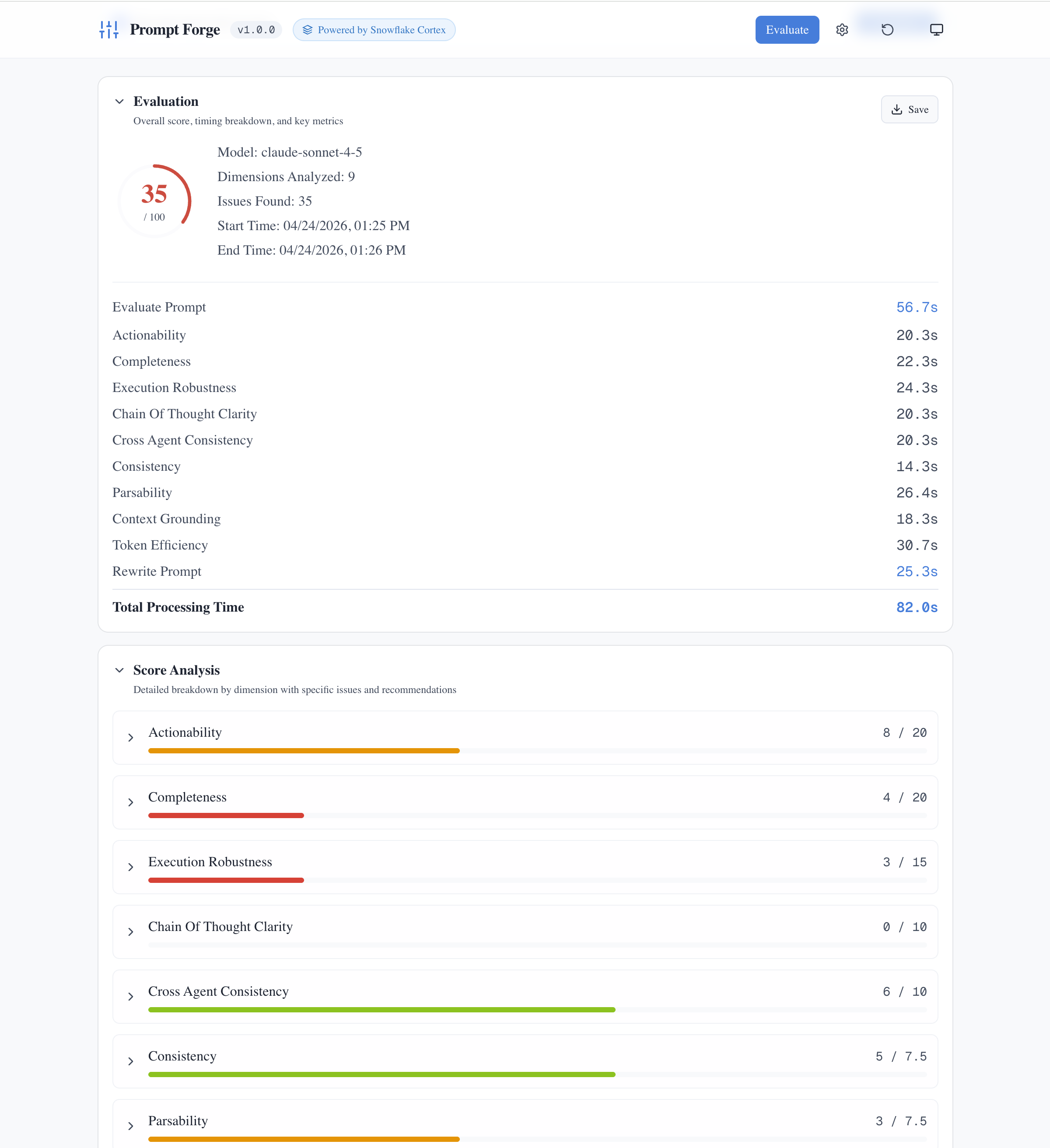 Each evaluation breaks down scores by dimension. This prompt scored 35/100, revealing weaknesses in Completeness (4/20) and Execution Robustness (3/15). The timing breakdown shows how long each dimension took to evaluate.
How scoring works
Each dimension is scored 0-5, but not all dimensions contribute equally to the final score. Weights amplify or dampen each dimension’s impact:
- Actionability and Completeness carry a 2.0x weight. I believe they’re the most critical for coding tasks
- Execution Robustness carries 1.5x
- Cross-Agent Consistency and Chain-of-Thought Clarity carry 1.0x (baseline)
- Consistency and Parsability carry 0.75x
- Context Grounding and Token Efficiency carry 0.5x. They’re important but secondary.
The weighted scores combine to a 100-point maximum, then map to letter grades (A through F).
A note on these choices: the dimensions themselves should be generally universal. Things like Actionability, Completeness, and Consistency matter for almost any prompt intended to produce reliable output. But the specific weights? Those are informed by my usage and my testing. I’ve tuned them for coding and building tasks where clear instructions and complete specifications matter most.
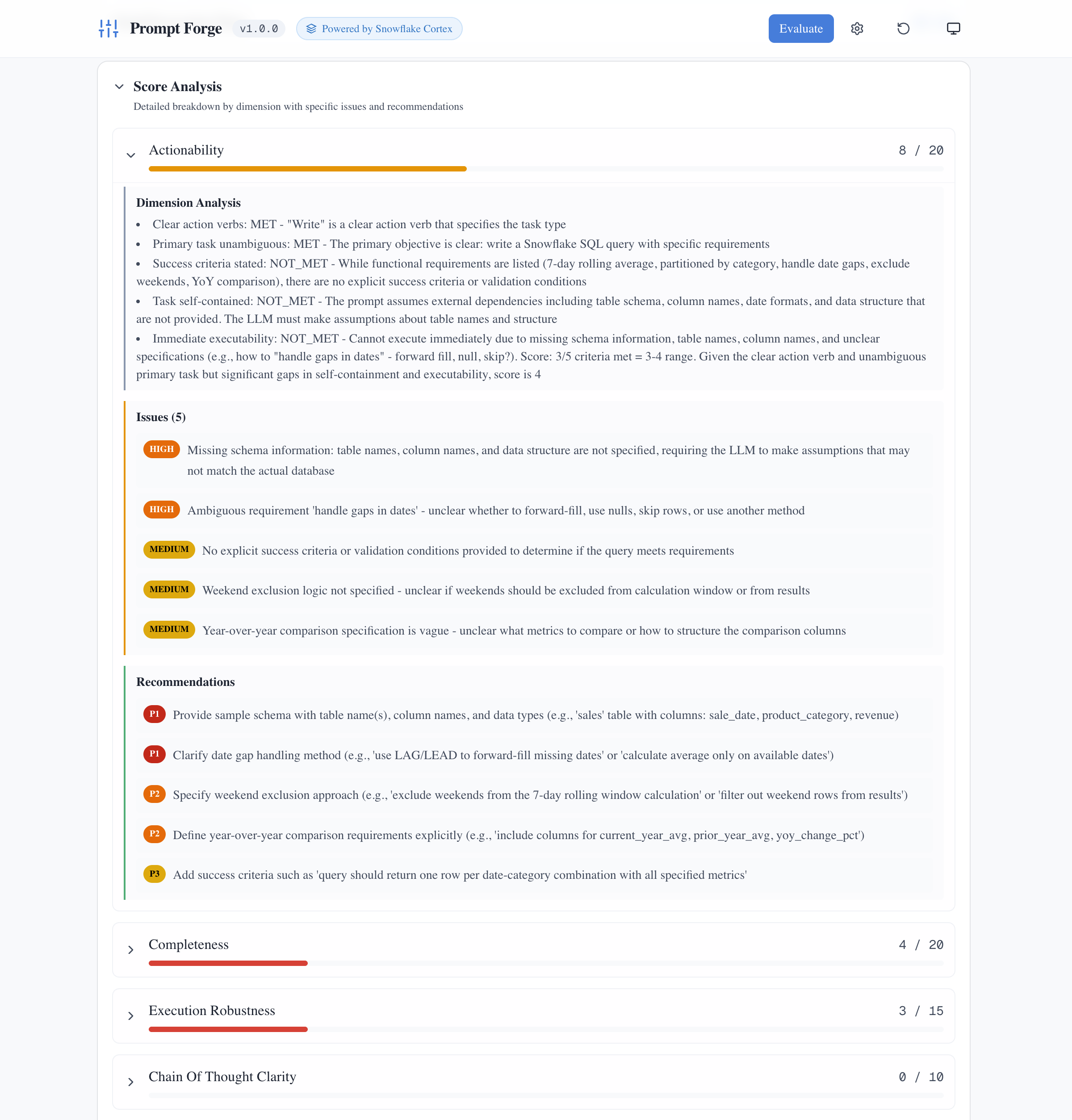 Expanding any dimension reveals detailed analysis: what criteria were met or missed, specific issues identified with severity levels, and prioritized recommendations for improvement.
That same idea drives the scoring: fewer hidden assumptions, clearer criteria, and more consistent output across models.
Why Snowflake Cortex?
I work at Snowflake, so easy access was part of it. But the real reasons are about eliminating variables and simplifying the technical implementation.
One API, many models
Prompt Forge uses Snowflake’s AI_COMPLETE function under the hood. That single function gives me access to models from Anthropic, OpenAI, Google, Meta, Mistral, and others, all through the same SQL interface. I don’t have to manage separate API keys, handle different authentication schemes, or write adapter code for each vendor’s SDK.
If I’d built this on raw APIs, I’d be maintaining:
- Anthropic’s
messagesAPI with its specific request format - OpenAI’s
chat/completionsendpoint with its own conventions - Google’s Vertex AI with yet another authentication model
- Rate limiting logic that differs per provider
- Error handling that varies by vendor
Instead, I write one SQL call: SELECT SNOWFLAKE.CORTEX.AI_COMPLETE(model_name, prompt). The model differences are still there—that’s the point of comparison—but the API differences are abstracted away.
Isolating what matters
If you give the same prompt to Cursor and Claude Code, the agentic coding tool has system prompts and behaviors that impact how the prompt is interpreted. The model isn’t just seeing your prompt—it’s seeing your prompt filtered through the tool’s context.
I wanted to eliminate that variability. Using Cortex ensures that the only differences in output should be the selected model and the prompt itself—not the APIs, tooling, or hidden system prompts used to interact with the model. When you’re trying to answer “is this prompt good?”, you need to isolate the variable that actually matters.
Model availability
Cortex provides access to a growing list of frontier and open-source models. As of this writing, that includes Claude Sonnet and Opus, GPT-4o and GPT-5, Gemini Pro, Llama, Mistral, DeepSeek, and others.
Snowflake has launch partnerships with frontier model providers that enable quick access to new releases. When Anthropic released Claude Opus 4.5, it was available through Cortex AI the same day. Same with OpenAI’s GPT-5.2. For a project like Prompt Forge, this means I can add new models to the comparison set as soon as they launch, with no new integration code required. Refresh the model list, and they appear in the picker.
Some frontier model vendors offer prompt optimization tools, but they’re tuned for their specific models. I wanted something that works across vendors without lock-in.
Building with Cortex Code
I built Prompt Forge with Cortex Code, Snowflake’s agentic coding CLI. That matters because this project was not just about evaluating prompts in theory. The coding workflow was part of the experiment.
The rubrics evolved while I was using Cortex Code on real work: researching, planning, refactoring, writing docs, and debugging code. I kept noticing the same pattern. Better prompts made the agent more predictable. Vague prompts created drift. Prompt Forge came out of that loop.
The first version came together in about a day. That would not have happened without an agentic coding workflow. Cortex Code made it practical to move quickly from “I keep seeing this problem” to a working app, then keep iterating on the UI, scoring logic, and model comparison flow over the next week.
Honest limitations
Before you dive in, a few caveats. The default rubrics in Prompt Forge are tuned for building and coding tasks—the kind of work where you’re asking an LLM to generate code, create documentation, write implementation plans, or refactor existing files.
You can use Prompt Forge to evaluate a general-purpose prompt that just answers questions. But the optimizations won’t be well-suited for those tasks. The scoring dimensions assume you want consistent, executable, robust output—not conversational engagement or creative exploration.
Who this is for
That said, Prompt Forge is intentionally educational. I built it because I realized that users with less experience wouldn’t know model variance was even a potential issue. I envision several audiences:
- Developers who vibe-code daily and want to get better at prompting
- Teams standardizing prompts across projects and contributors
- Researchers benchmarking model consistency
- Anyone curious about why their prompts work better with some models than others
Will this lower the bar for effective AI-assisted development? Maybe a little. But I think it mostly shifts the workload. Instead of learning prompt engineering through trial and error, users can focus on articulating what they want and what matters, then let the tool and LLMs generate an optimized version.
I see this as a time-saver as much as an efficacy improvement.
An invitation to contribute
Here’s where I need your help.
Are the weights right? I don’t know. They reflect my priorities based on my use cases. Your priorities might be different:
- If you’re building multi-step agents, Chain-of-Thought Clarity might deserve a higher weight
- If you’re generating structured data, Parsability might be more critical than I’ve rated it
- If you’re working in a domain where examples are essential, Context Grounding might need a boost
The rubrics themselves are tunable. Each dimension is defined in a YAML file under config/rubrics/. You can adjust:
- The criteria for each score level (0-5)
- The weight/boost applied to the dimension
- The specific language that guides the LLM’s evaluation
Prompt evaluation is still messy. There’s no industry-standard rubric, and no peer-reviewed consensus on optimal weights. I’m sharing what worked for me, but I don’t think this is finished.
So give me feedback. What weights would you change, and why? What specific use case drove that recommendation? Feedback like “I work on X, and Y weight made more sense because Z” would help refine the defaults for everyone. File issues. Submit PRs. Help the community figure out what “good prompt hygiene” actually looks like across different contexts.
Getting started
Here’s what you get: a vague prompt goes in, and a structured specification comes out.
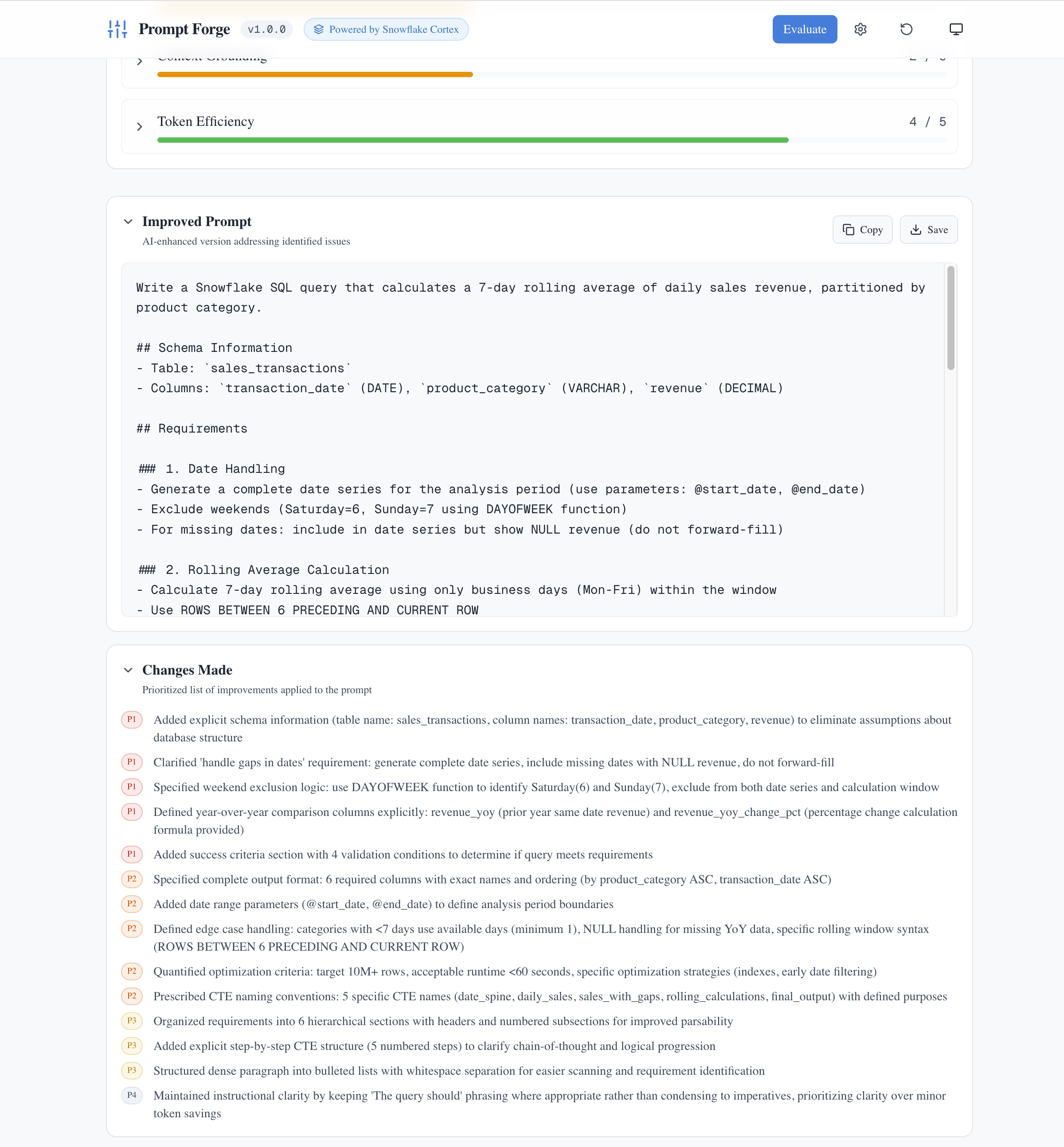 The payoff: an optimized prompt with clear structure (Schema Information, Requirements, Rolling Average Calculation) and a detailed list of changes made. Notice how a vague prompt became a comprehensive specification with explicit schema, date handling rules, and success criteria.
If you want to try it yourself, you’ll need:
Prerequisites:
- Node.js 24+ and npm 11+
- Snowflake account with Cortex enabled
~/.snowflake/connections.tomlconfigured with your credentials
Quick start:
npm install && npm run dev
Open http://localhost:3000. Enter a prompt, even something simple like “Write a Python function to parse JSON,” select a model, and click Evaluate. Within seconds, you’ll get a dimension-by-dimension breakdown with scores, specific recommendations, and an optimized version ready to copy.
For production deployment to Snowpark Container Services, multi-model comparison workflows, and full configuration details, check the project README and documentation.
This post is part of my ongoing exploration of AI-assisted development. Previous experiments: Four-Model Code-Off, Streamlit Rule Refactoring, README Improvements, and The Ultimate Pair Programmer.
See also
- What four experiments taught me about model personality
- Four Signals, One Decision: How Ensemble AI Solves Unstructured Data Matching
- The Ultimate Pair Programmer - Why AI Coding Needs Human Experience
- When Three AIs Fixed a README - The Unanimous Verdict Nobody Expected
- When Three AIs Tried to Fix 1,717 Lines of Code